How to Manage Your Risk Using Our MT4/5 Risk Manager EA: A Setup Guide
Most traders don’t blow their accounts because they pick the wrong setups. They blow them because they size positions wrong on the right setups.
A risk manager EA fixes that. Drop it on a chart, type your risk parameters, and let the tool handle the math. No more "I’ll just use 0.5 lots like last time." You get the exact lot size based on your account size, your stop loss distance, and the instrument you’re trading every single time.
This guide walks you through what a risk manager EA actually does, why proper risk management beats the best trading strategies in the long run, and exactly how to install and use the free Switch Markets Risk Manager EA on MT4 and MT5.
What Is a Risk Manager EA?
A risk manager EA is an Expert Advisor designed to handle the risk and trade management side of your trading process.
Unlike a fully automated trading EA that hunts for setups and executes trades on its own, a risk management EA leaves the trading decisions to you. It’s a co-pilot, not an autopilot.
Here’s what it actually does:
- It reads your account currency, your account size, and the instrument on your chart.
- It takes your inputs (the entry price, stop loss, and take profit you want), then automatically calculates the exact lot size that matches your chosen risk.
- It places the order at market price or as a pending order in one click.
In other words, the EA removes every step where you can fat-finger a number, second-guess the size, or simply forget to set a stop. The strategy stays in your hands. The math, the discipline, and the execution go on autopilot. But, crucially, before you start using a risk manager EA, you must fully understand how lot size in trading works.
Why Is It Important to Use a Risk Manager EA?
Three reasons stand out: math, time, and consistency.
The math is harder than it looks
Calculating the exact lot size based on a 47-pip stop loss on EURJPY when your account is denominated in USD takes a multi-step calculation that changes for every instrument.
Most traders either round it (and end up risking more than they planned) or skip it entirely (and trade by feel). Both habits chip away at the account over time. A good risk management tool does the math correctly to four decimal places in a fraction of a second.
Time matters because the market doesn't wait
When the price prints your signal, you have seconds to decide. If you’re still typing your stop loss into a calculator, you’ve already missed the entry price you wanted.
A risk manager EA collapses position-sizing into a one-click operation, so the only thing you spend time on is the trading decision itself.
Consistency is the edge
Most retail trading strategies look profitable on a backtest and lose money in live trading because the trader sizes inconsistently.
A risk manager EA enforces the rules you set when you were calm and rational, even when you’re tilted, tired, or hunting for revenge after a loss. That alone is a game-changer for retail traders.
Key Features of a Good Risk Management Tool
Not every EA labeled "risk manager" is worth installing. The good ones share a few distinct advantages over basic lot size calculators and standalone indicators.
Automatic lot size calculation
The tool should automatically calculate the exact lot size based on your account currency, the instrument, and your stop loss distance for forex pairs, indices, gold, oil, or whatever else you trade.
If it only works on a handful of forex majors, walk away.
Pending orders and market orders
Sometimes you want to enter at the market price. Sometimes you want pending orders sitting at a specific level so you can walk away. The EA should handle both without forcing you into one workflow.
A user-friendly chart panel
A clean interface that shows your entry, stop loss levels, and TP levels beats a cluttered settings panel every time.
How to Install the Switch Markets Risk Manager EA on MT4/MT5
Setting up Switch Markets Risk Manager EA takes about five minutes from start to finish. Here are the steps for both platforms.
Step 1: Open a Switch Markets demo or live trading account
The Risk Manager EA is free for Switch Markets clients. Open a free demo account (or fund a live trading account if you’re ready to go live), then request access to the Risk Manager EA. You’ll get the download link by email within a few minutes.
Step 2: Download MT4 or MT5
If you don’t already have MetaTrader installed, download MT4 or download MetaTrader 5. Log in with the credentials you got when you opened your trading account.
Step 3: Save the EA file
Save the EA file from your email to your desktop. The file extension will be either .ex4 (for MT4) or .ex5 (for MT5). If it arrives in a .zip archive, extract it first.
Step 4: Open MetaTrader's data folder
Inside MetaTrader, click File in the top menu, then click Open Data Folder. A file explorer window opens, showing the MetaTrader directory.
Step 5: Move the EA into the Experts folder
In the file explorer:
- For MT4: open MQL4, then open Experts.
- For MT5: open MQL5, then open Experts.
Drag the EA file into that Experts folder, then close the Explorer window.
Step 6: Refresh MetaTrader
Back in MetaTrader, find the Navigator panel on the left. Right-click on Expert Advisors and click Refresh. The Switch Markets Risk Manager EA will appear in the list. (If you don’t see Navigator, press Ctrl + N or click View, then Navigator.)
Step 7: Enable AutoTrading
At the top of the platform, click the AutoTrading button. The icon should turn green. Without this step, the EA can read the chart but can’t place trades.
For deeper detail on installing any expert advisor, see our full guide on installing EAs in MetaTrader. We have a library of educational resources on EA tools as well.
Step 8: Drag the EA onto a chart
Open the chart for the instrument and time frame you plan to trade. Drag the Risk Manager EA from the Navigator onto that chart. A settings dialog appears.
In the Common tab, tick "Allow live trading." In the Inputs tab, set your defaults such as risk percentage, default stop loss distance, daily limits, and so on. Click OK. A small smiley face icon at the top right of the chart confirms the EA is running.
That’s it. You’re ready to trade.
How to Use the Risk Manager EA: A Step-by-Step Walkthrough
Installing the tool is only half the work; the point is to use it on every trade. Here’s the workflow.
1. Pick your chart
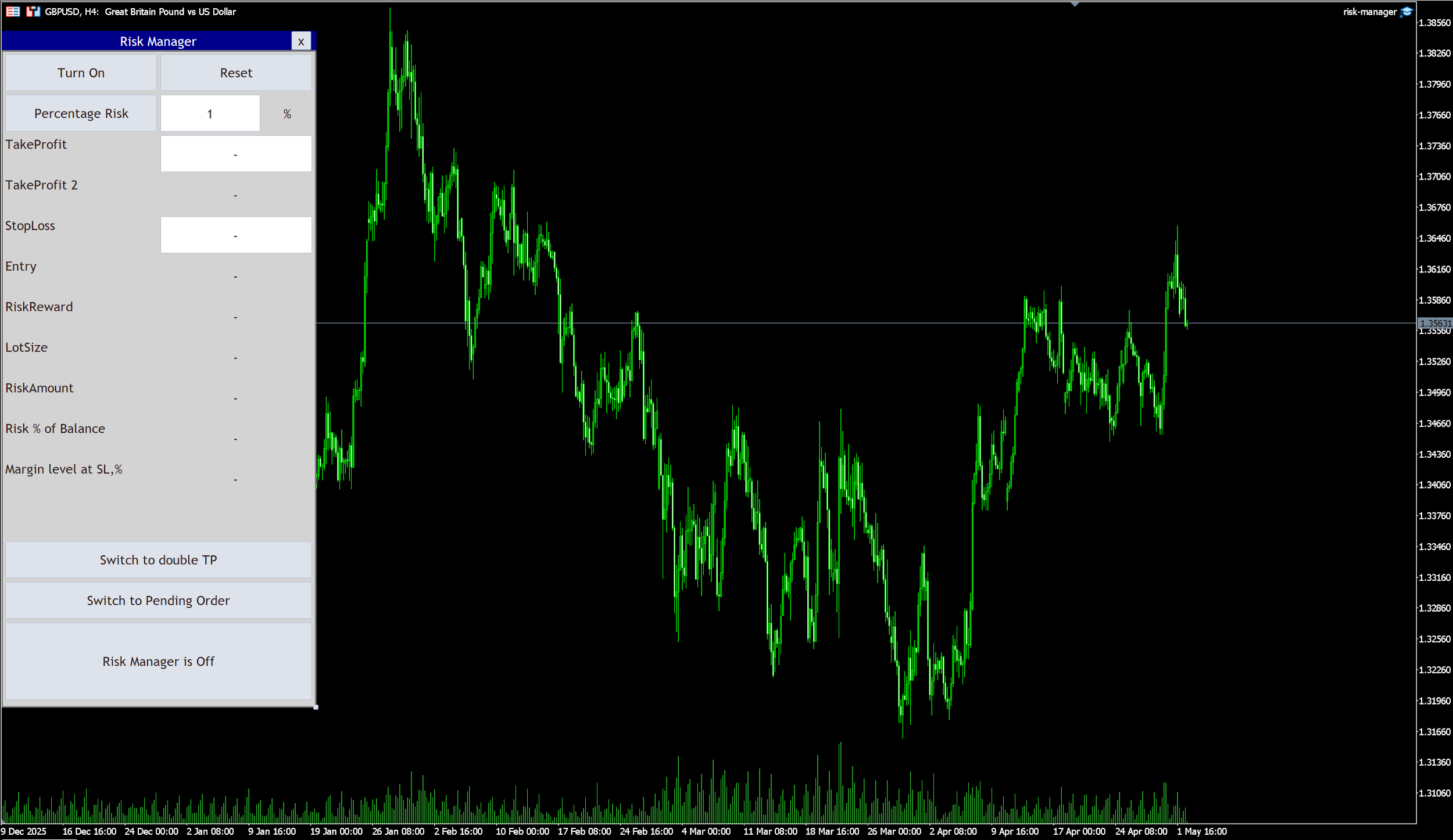
After installing the EA, click on "Turn On" to start using it.
Choose the instrument you want to trade. The EA reads its context from the chart it’s attached to, so GBPUSD on the H4 chart and Gold on the M15 chart need separate instances if you trade both.
2. Choose your risk type
In the EA’s on-chart panel, pick either fixed sum or percentage. Fixed sum risks a flat dollar amount per trade and is useful when you want every loss to feel the same regardless of equity. Percentage risk scales with the account, which compounds gains naturally and reduces position size automatically during a drawdown.
For most traders, 0.5%–2% per single trade is the sweet spot. Anything north of 5% is reckless on a retail account.
3. Enter your risk amount
Type the number. If you chose fixed, enter the dollar (or account currency) amount. If you chose percentage, enter the percent. The EA does the rest.
4. Set your entry, stop, and target
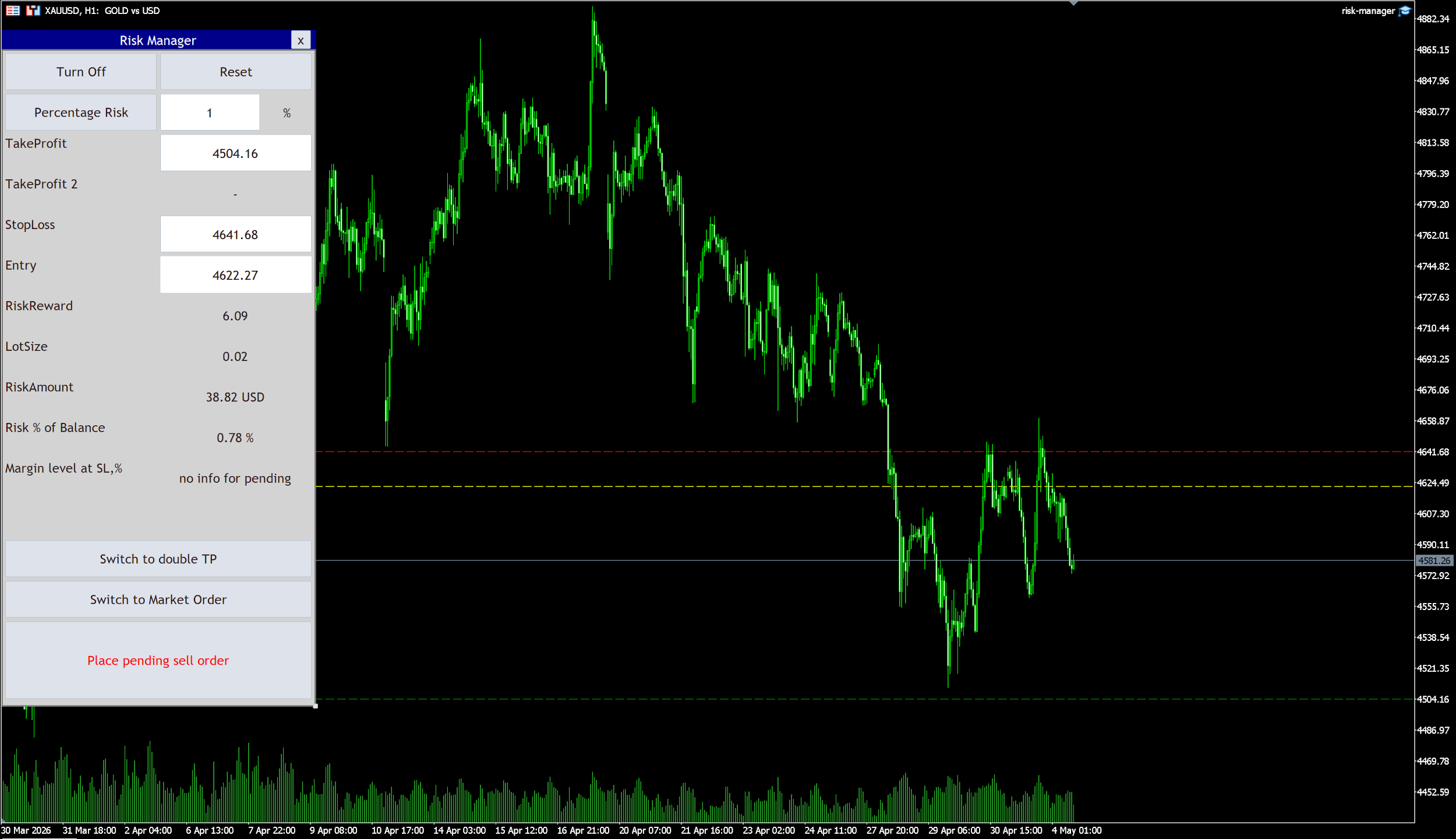
The Switch Markets Risk Manager EA shows two important text fields (Stop loss and take profit) when you want to use a market order. Whereas, it changes to three to include the entry price when you decide to use pending orders.
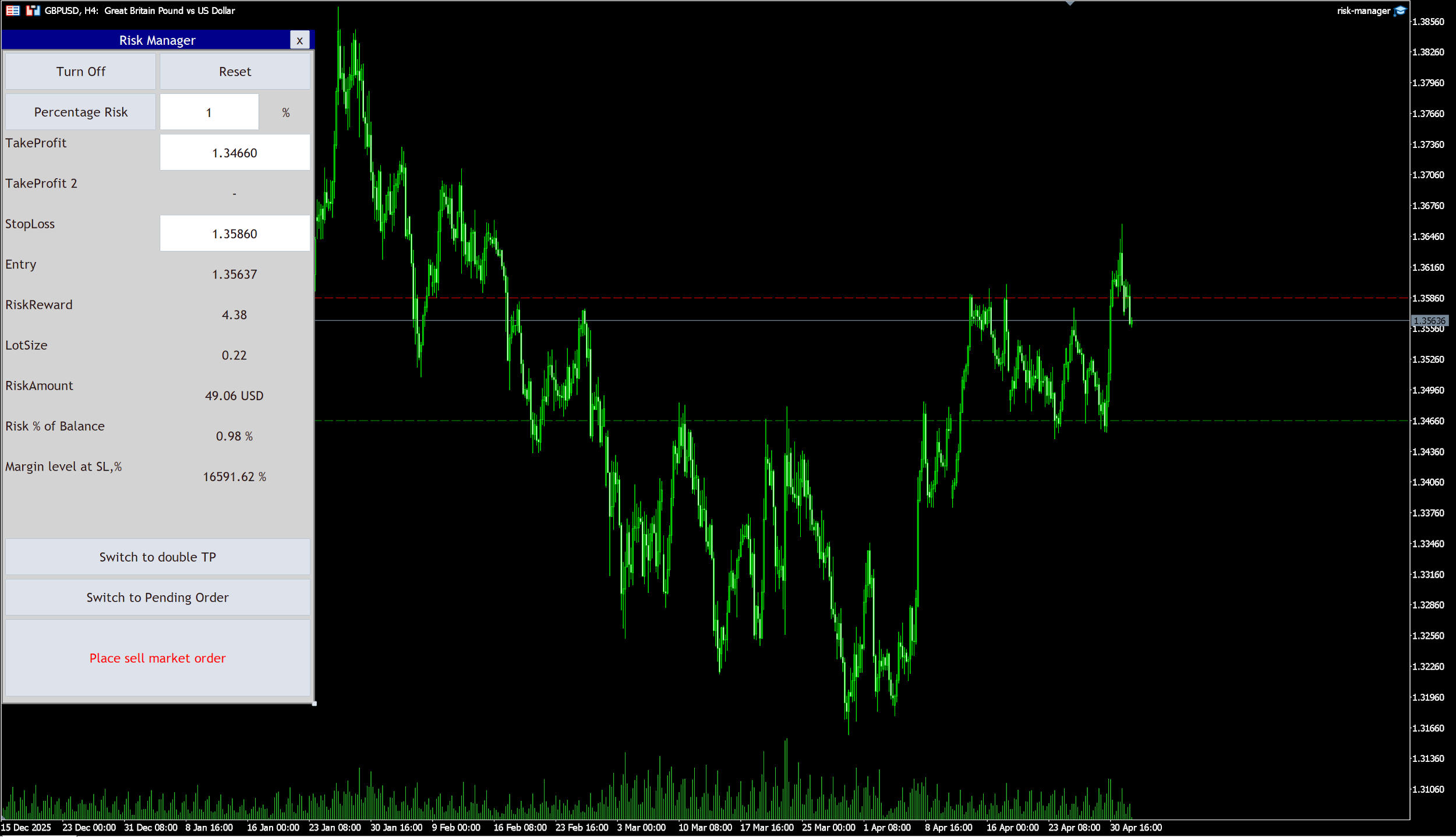
So, if you’re not entering immediately, set the order as a pending order. The EA will fire it the moment the price reaches your entry.
5. Confirm the lot size
Look at the calculated lot size. If your stop loss is wider than usual or you’re trading a more volatile instrument, the lot size will be smaller. That’s the tool doing its job.
Sanity-check the available margin and equity readout shown by the EA. If the margin is tight, either widen the stop loss or reduce the risk percentage.
6. Send the order
If everything looks perfect, click the Buy or Sell button on the EA panel. The transaction goes to market with the exact lot size, stop loss, and take profit attached. No second window. No retyping.
Tips for Getting the Most From the Risk Manager EA
A few habits sharpen the trading experience.
Run it on a VPS
A virtual private server keeps your MT4/MT5 (and the EA) online 24/7, even when your laptop is closed. That matters most for pending orders and trailing stops, which need a live connection to fire. Switch Markets clients get a free forex VPS. So, set it up once and forget it.
Test on a demo account first
Before you trust the EA with real capital, run it for a week on a demo account using the same setups you’d take live.
You’ll learn how the partial closes feel, whether your daily limits are sensible, and how the trailing stop interacts with your time frame.
Use it for every trade
This is important, especially at the beginning of your trading journey. The traders who survive are the ones who size every trade by the same rules, including the "easy" setups. Skipping the EA on a trade you’re sure about is exactly when bad position sizes sneak in.
Pair it with a trading journal
The EA enforces sizing; a free trading journal tracks whether your strategies actually have an edge. Together, they give you the full picture.
Download Our Free Trading Journal Template
Wrapping Up
In sum, a risk manager EA isn’t a magic profit machine. It won’t pick winning setups for you, and it won’t replace screen time. What it does do is remove the small habits that are killing your profitability: oversized positions, missing stops, inconsistent sizing, and emotional decisions in the heat of a move.
For most retail traders, that’s the difference between an account that compounds and an account that disappears.
Pair good risk management with a strategy you trust, run it on a VPS, and trade your plan. The Switch Markets Risk Manager EA gives you the structure to do exactly that for free, on MT4 and MT5, across forex, indices, gold, and the rest of the market.
FAQs
A few questions come up often enough that they're worth answering up front. Here are the ones we hear most.
Is the Switch Markets Risk Manager EA really free?
Yes. Switch Markets clients get the Risk Manager EA, the free VPS, and a suite of other EA tools at no cost. Open a free demo account or fund a live trading account to access them, and our support team can walk you through the setup if you get stuck.
Does it work on indices and gold, or only forex?
It works across forex, indices, gold, and other commodities, shares CFDs, and digital currencies. The EA calculates the exact lot size correctly for each instrument’s contract size, regardless of whether you’re trading EURUSD, US30, or XAUUSD.
Does the EA execute trades on its own, or does it just calculate?
It does both. The Risk Manager EA calculates the lot size and lets you place the trade with one click. Once the trade is live, the trade manager handles break-even moves, trailing stops, and partial closes, but only based on the rules you set. It doesn’t open trades on its own, so the trading decisions stay with you.
Will it work on both MT4 and MT5?
Yes. There’s a separate file for each platform. Make sure you download the version that matches the MetaTrader you’re using. That is, .ex4 for MT4 and .ex5 for MT5.
Do I need to know how to code to use it?
Not at all. The EA is fully built and ready to use. You just install it, drag it onto a chart, and type your inputs. The panel is user-friendly enough that traders new to MetaTrader can have it running on the first try. No MQL4 or MQL5 knowledge required.
Risk Disclosure: The information provided in this article is not intended to give financial advice, recommend investments, guarantee profits, or shield you from losses. Our content is only for informational purposes and to help you understand the risks and complexity of these markets by providing objective analysis. Before trading, carefully consider your experience, financial goals, and risk tolerance. Trading involves significant potential for financial loss and isn't suitable for everyone.